
Lucky Twice Casino Mobile App for UK Players
LuckyTwice Casino ensures that its players can enjoy playing games on different devices. We have optimised our website to perform without hitches, lags or other issues on mobile phones, tablets and computers. You can open and use the site on browsers, whether on your phone or desktop. However, if you are looking for a quicker way to access our products, install the Lucky Twice Casino mobile app. It is a Progressive Website Application that you can install when you open our website on your browser.

How to Use the LuckyTwice Mobile App
The design of our mobile software closely mirrors the desktop version. However, take a short tour to learn where each feature is. Look for the sign-up and login buttons and join your account. Scroll through the website to find features like the wallet, loyalty program page, promotions, games, customer support and others.
Use some of the available features. You can start with the search bar to find specific games. Another thing you can do is to play demo mode games. Test the deposit feature to add funds to your account. Once you do, go to your account and view your balance. You can use the “Send Message” button to talk to customer support. Casino LuckyTwice app users can also activate bonuses, play tournaments and join the loyalty program.
How to Use and Install on Android
Our mobile application has all the features of a casino. You will be able to access slot machines, digital tables, bonuses and others. Here is how to install it:
- Open your browser and launch our casino.
- Go to your browser menu and find the “Add to Home Screen” option.
- Tap the “Install” button, then the “Add” button to begin the installation.
- Check your home screen on your phone and tap to open the Lucky Twice application.
How to Use and Install on iOS
iPhone and iPad users can use our mobile app to sign up, play all games on the site, get bonuses and finish other casino activities. Here is how to download the PWA on your iOS devices:
- Open the site on your Safari browser.
- Tap the share button to see the option to add the platform to your home screen.
- Click “Install” to begin the download of the LuckyTwice app.
- Finish the installation and open the app to sign up or log in.
Supported Devices
You can use our software on different devices. These include:
| Devices | Characteristics |
| Android and iOS phones | Supports both the Lucky Twice mobile app and the browser-based gameplay, with long battery life for long gaming sessions. AMOLED screen display for Android and Retina display for iPhones, ideal for sharp, colour-rich graphics. |
| Desktop and laptop | Powerful processors and dedicated graphics cards, a large display screen, which are ideal for multitasking (play and work). |
| Tablet and iPad | Up to 10 hours of battery life, making it ideal for long gaming sessions and a bigger display screen for live dealer gaming. The devices are compatible with the Lucky Twice app and the browser version. |
Lucky Twice Casino App Interface
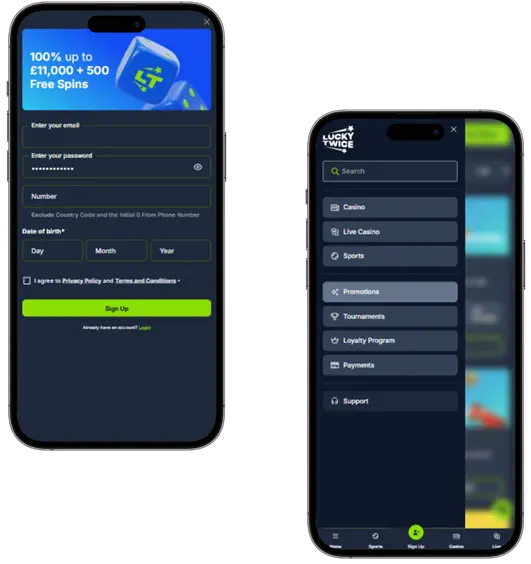
The first thing you will notice when you open the application is a dark background with the brand name. Other features load instantly, including the Join Now and Login buttons. Once you log in, you will notice the background is still black. Important icons are highlighted in green, while the font is white. Speaking of fonts, it is large enough for you to read comfortably.
You will find a banner just below the header. We publish important notices and bonuses here. Tap the menu bar to reveal the sidebar menu and its content. You can tap any option on the menu, like live casino, slots, blackjack, game shows, loyalty program, promotions or help centre to reveal the content on your screen. The Casino Lucky Twice mobile app is responsive to touch. You can switch between sections by tapping or scrolling.
Account Registration and Deposit
The Lucky Twice UK mobile app is designed to function like the desktop version. As such, you can register and deposit funds on the website:
- Tap to launch the application on your mobile or tablet.
- Click the “Join Now” button. It is highlighted with a green colour for easy visibility.
- Fill in your information on the form that pops up. Add your email, phone number, date of birth and create your password.
- You can read our terms and conditions and privacy policies before accepting them.
- Tap the “Sign Up” button.
Your account is ready to use. You will be able to access features like demo mode games, bonuses, tournaments and the loyalty program. If you are ready to play for real money, follow these steps to deposit funds:
- Log in via the Lucky Twice Casino app.
- Tap the “Deposit” button at the top of the screen.
- Choose your deposit method and enter the amount you wish to transfer if using fiat methods.
- If using crypto, copy the address provided and go to your crypto wallet.
Benefits of Using the Lucky Twice App
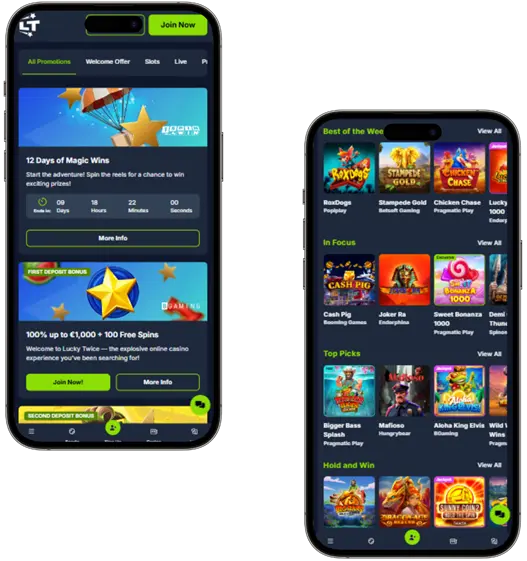
Our application provides many benefits, like access to over 10,000 games including slots, live dealer, game shows, instant win and digital tables. It loads instantly, allowing users to begin their gaming sessions immediately. You can make fast deposits using options like Apple Pay, Google Pay and cryptocurrency. The user interface is built for mobile use. You can tap to open tabs, choose games, bet, deposit and complete other actions.
You will be able to see your actual account balance, game outcome and new features when using the LuckyTwice Casino mobile app. When you load the application, it automatically updates, allowing you to access the same bonuses, games, tournaments and other features present on the desktop version.
Security and Data Protection
We implement various measures to ensure the security of the Casino Lucky Twice mobile app and that of its users. One of these is HTTPS. You can see this in the browser when you load the platform. It confirms that you are on a secure website and can use your login credentials, deposit and withdraw without worrying about data leakage.
Another measure we have put in place to enforce HTTPS is TSL encryption. For example, your driving licence, passport, utility bill and payment method are TSL-encrypted when you submit them for us to review. The LuckyTwice Casino app on your phone also benefits from your device’s security measures. You can use biometrics, pattern, PIN and 2-factor authentication to secure your account.
Bonuses for Mobile App Players
You can be the first to claim a bonus as soon as it is added to the calendar. Lucky Twice Online Casino app users can get the following offers:
| Bonuses | Details |
| Welcome Bonus | This is a 100% up to GBP 500 plus 250 free spins. Claim the offer by depositing GBP 20 or more. |
| Spin Fiesta | Claim 50 free spins every time you deposit GBP 30 or more on Tuesdays. You can claim the offer as many times as you can. Use the FIESTA promo code while depositing to activate it. |
| Cin-Cin Weekend | This boosts your weekend deposit by 77%. You can get up to GBP 777. Deposit GBP 30 or more, using WEEKEND as your voucher. |
| Spin the Wheel | You can spin the wheel at least once a day to win prizes like free spins, bonus funds, cash prizes and a bonus combo. |
| Tournaments | Participate in tournaments that are available on the Lucky Twice app to win cash prizes and bonuses. |


